Here are some
examples of
|
matched suites of
|
web-safe colours
|
for text & background
|
Using a colour wheel
Here there are possibilities for endless fun...
You can, for example,
- start with a color you like
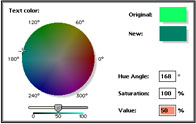
- and play with just one variable - the hue, the saturation, the
value, the lightness...
- ...until you find the two extremes which suit you, such as the
lightest and the darkest, or the most saturation and the least;
- notice the numerical values of those two colors;
- then you can divide those values evenly into five or six
steps, and type them in...
For example, starting with hue angle 140° (that's the
turquoise or teal shade you can see above) and 100% saturation - a
'thick' colour - I found that lightness of between 15% and 75% was
usable: which divides up neatly into steps of 15 - 30 - 45 - 60 -
75%, and looks like this -
|
MMMM
|
MMMM
|
MMMM
|
MMMM
|
MMMM
|
|
15%
|
30%
|
45%
|
60%
|
75%
|
Again, keeping the hue at 300°, a nice shade of violet, the
lightness at 40% and changing the saturation from 0% to 100% gives us
0 - 25 - 50 - 75 - 100%, and looks like this -
|
MMMM
|
MMMM
|
MMMM
|
MMMM
|
MMMM
|
|
0%
|
25%
|
50%
|
75%
|
100%
|
- and finally you need to convert them to hexadecimal
RGB values, which the wheel will normally do for you. If
by chance you get them only in percent, the conversion to
the 256-scale is rather straightforward, whether it's
decimal or hexadecimal -
|
|
0
|
0
|
00
|
|
20
|
51
|
33
|
|
40
|
102
|
66
|
|
60
|
153
|
99
|
|
80
|
204
|
CC
|
|
100
|
255
|
FF
|
|
You might like to look at what's like working with the other tools
- HERE
David Kettlewell